
Your Year-End Digital Checkup After 60
Give your money, memories, and online life a simple year end digital checkup. Learn how adults over 60 can protect accounts, organize photos, and use AI safely.

Your Year-End Digital Checkup After 60
Simple Ways To Protect Your Money, Memories, and Online Life
As we roll into the last weeks of the year, most of us think about cleaning out the fridge, clearing the pantry, or getting our bodies moving again after holiday meals.
But there’s another “health check” that matters just as much as sleep and veggies:
👉 Your digital health — your money, your memories, and your online life.
If you’re 60 or older (like me), you’ve lived through so many technology changes it’s almost funny. Landlines to smartphones. Film cameras to cloud storage. Handwritten letters to emails and DMs. It’s a lot.
The good news? You don’t have to become a tech expert. A simple year-end digital checkup can help you:
- Protect your money from scams and “oops” moments
- Keep your family photos and documents safe
- Make your online life calmer and more organized
- Use AI tools to help you, without giving up your privacy
Think of this as part of your healthy aging routine — another way to thrive beyond 60 and keep stress levels down so you can flex your plant power in all the fun parts of life.
Let’s walk through it together.
Step 1: Give Your Money a Quick Digital Safety Check
You don’t need to overhaul everything. Just focus on the accounts that matter most:
- Online banking and credit cards
- Retirement accounts
- Online bill pay (utilities, phone, internet, etc.)
- Shopping accounts you use often (Amazon, big retailers)
1. Update passwords where it really counts
If you haven’t updated your password in years, you’re not alone. Start with the big ones:
- Bank accounts
- Credit cards
- Email account (this is a big one — your email is often the “key” to everything else)
For each important account, aim for a password that is:
- Longer than 12 characters
- A mix of letters, numbers, and symbols
- Not based on your birthdate, grandkids’ names, or pets
You can also use a password manager if that feels comfortable for you, but even a secure written list stored in a safe place is better than reusing the same old password everywhere.
Mini challenge: Choose one important account today and change the password to something strong. That’s it. One small action.
2. Turn on extra sign-in protection (if available)
Most banks and many other sites let you turn on an extra layer of security (often called “two-step verification” or “two-factor authentication”).
How it usually works:
- You sign in with your password.
- The site texts you a code or sends a code to an app.
- You enter that code to finish signing in.
It takes an extra moment, but it makes it much harder for someone else to get into your accounts.
3. Scan for weird charges or subscriptions
Set aside 15–20 minutes to look through:
- Your bank statements
- Your credit card bill
- Your PayPal or other online payment service, if you use one
Look for:
- Small recurring charges you don’t recognize
- Old subscriptions you don’t use anymore
- Free trials that quietly turned into paid plans
If you’re unsure about a charge, contact the company using the official phone number or website — not a random email or text message.
Tip: You can ask an AI assistant like ChatGPT to help you write a clear, polite message canceling a subscription or asking a company to explain a charge. Just don’t paste in your full account numbers or very personal details.

Step 2: Protect Your Memories and Important Documents
Most of us have our life scattered across:
- Old laptops
- Phones (current and old)
- Cloud accounts we barely remember
- USB sticks and external drives
A year-end checkup is the perfect time to bring things together, at least a little.
1. Choose your “digital home base”
Pick one main place where you’ll store your most important digital items, such as:
- Family photos
- Scans of important papers (wills, health directives, insurance cards)
- Key passwords and account list (stored securely)
Your “home base” could be:
- A cloud storage service you already use
- An external hard drive
- A combination (for example, photos in the cloud, documents on an external drive in a fire-proof box)
The goal is simple: if something happens, you and your loved ones know where to start.
2. Gather your most important photos
You don’t have to organize every single picture this month. Just focus on:
- Favorite family photos
- Old photos you’ve already scanned
- Special events (weddings, births, big trips, holidays)
Move them into a clear folder system, for example:
- Family
- Friends
- Holidays
- Trips
- “Old Family Photos”
You can always come back later and refine it. Right now, it’s about getting them in one reliable place so they’re less likely to be lost.
3. Save your “must-have” documents
Ask yourself:
“If I had to leave my house quickly, what paperwork would I want to already have saved digitally?”
Common examples:
- ID (driver’s license, passport)
- Health insurance cards
- Medicare info
- Power of attorney documents
- Advance health directives
- Life insurance policies
- Home and car insurance information
Scan or photograph these and store them in a secure, clearly named folder.

Step 3: Start Your Simple Digital Legacy Plan
You don’t need anything fancy or legal to start. Just a clear list and a simple note.
1. Make a “map” of your digital life
Write down:
- Where your important digital items live
- (Photos: “Google Photos” or “External Drive in Hall Closet”)
- (Bills: “Online bill pay at XYZ Bank”)
- Which email address is tied to most of your accounts
- Any accounts you’d want a loved one to access someday
- Social media
- Cloud storage
- Photo sites
- Online banking / bill pay (this one is especially important)
Keep this list:
- Printed and stored in a safe place,
- Or saved in a secure digital file that someone you trust can access if needed.
2. Decide who should have access to what
This is your life. You get to choose who sees what.
You can note things like:
- “My daughter can access my family photos and cloud storage.”
- “My spouse can access online bills and banking if needed.”
- “Close friend can manage my social media if something happens.”
You don’t have to solve everything today. Even a simple note like:
“If something happens to me, start with this email address and this folder. That’s where my important information is.”
…is a big gift to your loved ones.
Step 4: Clean Up Your Online Life (Just a Little)
We all collect digital clutter: newsletters, apps, accounts, and websites we never use. Over time, it becomes noisy and overwhelming.
1. Unsubscribe from what you don’t read
Open your email and look at the last 20–30 messages:
- Are there newsletters or promotions you never open?
- Stores you bought from once but don’t plan to use again?
Unsubscribe from a few of them. Your future self will thank you.
Tip: Aim to unsubscribe from just 3–5 things each week in December. That’s it. Tiny, doable steps.
2. Delete apps you don’t use
On your phone or tablet:
- Remove apps you haven’t used in months
- Especially shopping, games, or “free” apps you no longer trust
Fewer apps = fewer notifications, fewer distractions, and fewer companies tracking your data.
3. Tidy up your home screen
Rearrange your most-used apps so they’re easy to tap:
- Health
- Banking
- Messages
- Maps
- Notes
- Photos
This sounds small, but it makes daily life smoother — especially when your hands are full of grocery bags or hiking gear.
Step 5: Use AI as a Helpful Assistant — Without Oversharing
AI tools like ChatGPT can be wonderful for people in their 60s and beyond:
- Summarizing long letters, articles, or medical explanations
- Turning confusing “tech talk” into everyday language
- Helping you compare offers, write emails, or organize plans
- Giving recipe ideas based on what’s in your fridge
The key is learning what to share and what to keep private.
What not to share with AI
Avoid pasting in:
- Full account numbers
- Social Security numbers
- Full medical record numbers
- Passwords or PINs
- Detailed financial account information
Instead, you can generalize:
- “A bank emailed me with an offer that says X… does this sound like a normal bank email?”
- “I got a letter about an ‘extended warranty’ on my car. Can you help me understand what they’re offering?”
- “Here’s a paragraph from my insurance letter (without personal details). Can you explain this in plain language?”
AI is a tool, just like a calculator or a recipe book. You stay in charge. You always make the final decision.
Step 6: Make It A Yearly Ritual
You don’t have to fix every digital issue this week. Think of this as a new habit — like your morning walk, your plant-based meals, or your evening stretch.
Here’s a simple yearly routine you can repeat every December:
- Money:
- Check bank and card accounts
- Update at least one password
- Cancel subscriptions you don’t use
- Memories & documents:
- Back up important photos
- Scan or store a few key papers
- Digital legacy:
- Update your “digital map” list
- Confirm who knows where things are
- Online life:
- Unsubscribe from a few emails
- Remove unused apps
- AI check-in:
- Decide one new way AI can help you in the coming year
- Remind yourself what you won’t share with any AI tool
Over time, these tiny actions add up to a calmer mind, fewer worries, and more room in your day for the good stuff — delicious food, strong bodies, hiking trails, creative projects, and people you love.
Final Thoughts: Thriving Beyond 60 Includes Your Digital Life
Healthy aging isn’t only about what’s on your plate or how many steps you take. It’s also about feeling safe, clear, and in control of the digital world we’re all living in now.
When you:
- Protect your money
- Safeguard your memories
- Clean up your online clutter
- Use AI carefully and wisely
…you create more space for the life you really want to live — one where you can thrive beyond 60, flex your plant power, and feel confident in both your body and your digital world.
If this year-end digital checkup sparked ideas for you, you can:
- Bookmark this post and work through one section at a time
- Share it with a friend or family member who’s also 60+
- Start your own small checklist for this weekend
Your digital life doesn’t have to feel overwhelming. One calm, clear step at a time is enough. 🌿💻
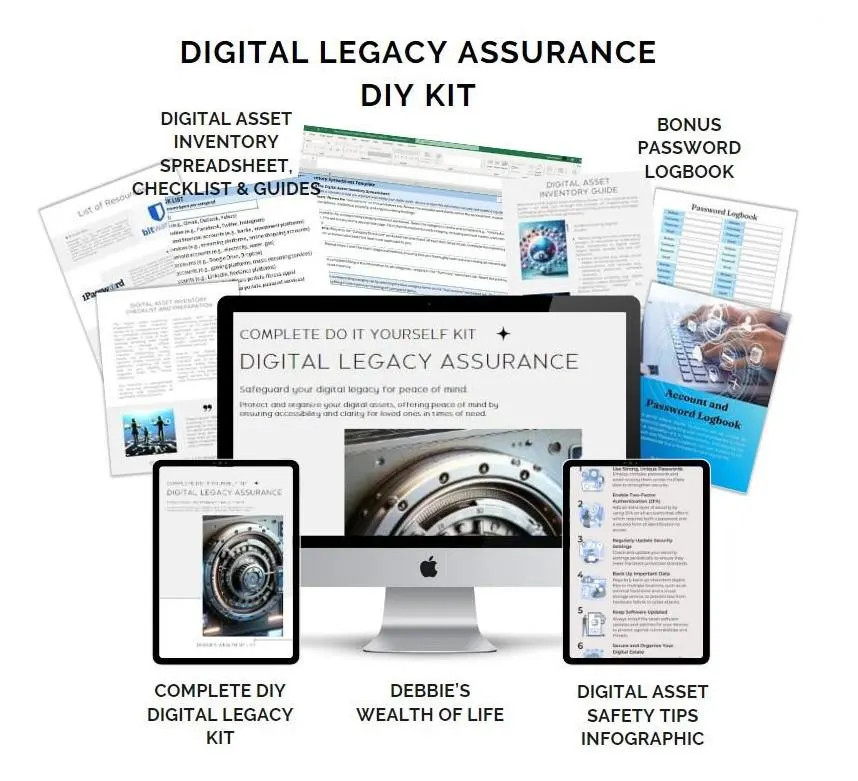
💚 Ready to protect what matters most and give your loved ones peace of mind?
Click here to purchase the Digital Legacy Assurance DIY Kit and start organizing your legacy today.
Disclaimer:
This content is for informational purposes only and is not medical advice. Always consult your healthcare provider before making changes to your diet, supplements, or lifestyle, especially if you have existing conditions or take medication.
💌Want plant-based tips each week
Join the Plant Based Flex newsletter. It’s free, and when you confirm your email I’ll send you a 7-Day Kickstart Wellness Bundle to help you thrive beyond 60.