
A Simple Digital Reset for Healthy Aging and Peace of Mind
My March Thursday tech and legacy focus is a simple digital reset for healthy aging. Use this practical routine to organize your files, accounts, and important info with less stress.
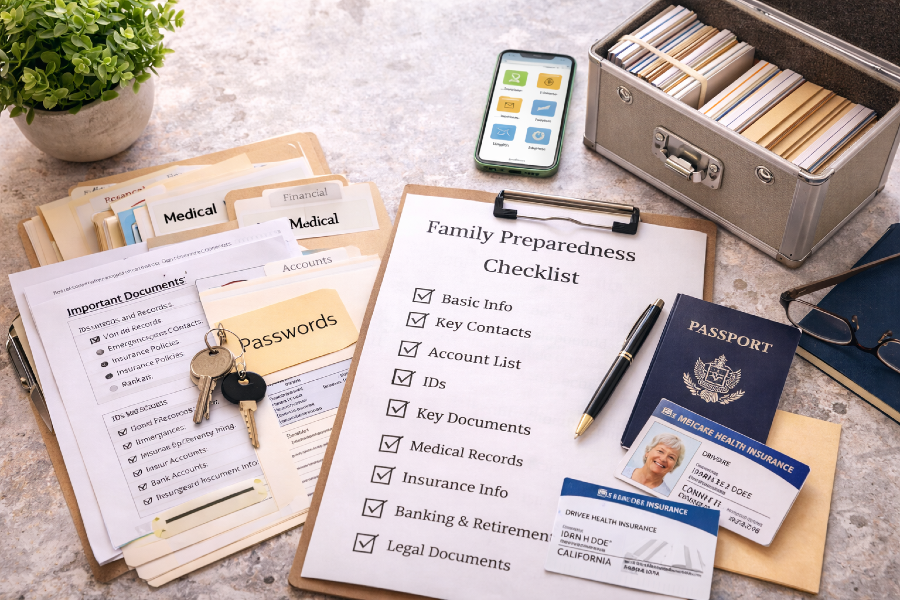
March Tech and Legacy Focus: A Simple Digital Reset for Healthy Aging and Peace of Mind
March always feels like a reset month for me.
Most people think of spring cleaning as closets, drawers, and maybe the pantry. I get that. I do the same thing. But this time of year is also one of the best times to clean up something that matters just as much, your digital life.
And honestly, this part matters even more as we get older.
Healthy aging is not only about food, movement, and sleep. It is also about reducing stress, staying organized, and making life easier for yourself and the people you love. That includes your files, passwords, account info, important documents, and all the little things that pile up and become a mess if you do not stay on top of them.
So for this Thursday tech and legacy post, I want to share my March focus:
A simple digital reset that helps you feel more in control, less scattered, and more prepared.
Nothing complicated. Nothing fancy. Just practical steps that support your life now and protect your future.
This is part of building a healthy and wealthy legacy in real life.
Why March Is the Perfect Month for a Tech and Legacy Reset
March is a natural transition month.
We are coming out of winter routines. We are starting to think about warmer weather, more movement, and fresh starts. It is also the perfect time to clean up the systems that quietly affect your stress levels every single day.
If your digital life feels cluttered, it can drain your energy in ways you do not always notice.
You forget where things are.
You waste time looking for files.
You keep putting off important updates.
You feel behind before the day even gets going.
That is exactly why I like using March to reset my digital systems.
Not all at once.
Not in one huge weekend.
Just step by step.

My March Tech and Legacy Focus
This month I am focusing on five areas:
- Digital organization
- Password and account cleanup
- Important document access
- Simple legacy planning basics
- A repeatable weekly tech habit
That is it.
If you handle these five areas, you will feel a major difference.
1) Start with a simple digital clean up
Before you do anything else, clean up your digital clutter.
I am not talking about spending eight hours organizing every folder on your computer. I mean start with the stuff that slows you down the most.
My simple rule
Fix what you use often first.
That usually means:
- desktop clutter
- downloads folder
- random screenshots
- duplicate files
- old document versions
Quick March reset steps
- Delete obvious junk
- Move important files into one main folder
- Rename files so they make sense
- Create 3 to 5 top level folders only
Keep it simple.
A clean digital space lowers friction. And lower friction helps you stay consistent.
2) Create one “Important Info” folder
This is one of the most helpful things you can do.
Create one folder called something like:
Important Info
or
Life Admin
or
Family Essentials
Inside that folder, create subfolders for the things you need to find fast.
Suggested subfolders
- Medical
- Insurance
- Home
- Bills
- Banking
- Taxes
- Work
- Business
- IDs and records
- Emergency contacts
You can adjust this to fit your life, but the point is to create one home base.
When everything is scattered, stress goes up.
When everything has a place, life gets easier.
3) Clean up passwords and logins
This is a big one.
A lot of people over 50 and 60 are carrying years of old logins, repeated passwords, and account confusion. That can create real problems later, especially in emergencies.
You do not have to fix every password in one day.
Just start.
My March password reset approach
- Update the most important accounts first
- Use strong unique passwords
- Write down your system in a safe way
- Make sure a trusted person knows where to find essential access info if needed
Start with these accounts
- primary email
- bank and credit accounts
- cell phone provider
- internet provider
- health insurance portal
- retirement or investment accounts
- business platforms you use often
This is not exciting work, but it is high value work.
It protects your time, your money, and your peace of mind.
4) Make your key documents easy to find
This part is huge for legacy planning.
If something happens, can your family quickly find what they need?
Most people think they are organized enough until someone actually needs to locate an important document fast.
March is a great time to fix that.
Key documents to gather and organize
- ID copies
- insurance information
- account list
- emergency contacts
- home documents
- business records
- tax documents
- medical info
- passwords system location
- any legal documents you already have
You do not need to make this complicated.
You just need a clear system.
Even one folder and one simple list is better than chaos.
5) Make a simple account inventory
This is one of the best legacy habits you can build.
Most people have way more accounts than they realize:
- bank accounts
- credit cards
- subscriptions
- shopping accounts
- social media
- cloud storage
- business platforms
- digital product platforms
- email accounts
If nobody knows what you have, it creates confusion later.
Create a simple account inventory list
Include:
- account name
- what it is used for
- where it is accessed
- billing frequency if it is a subscription
- who needs to know about it
You do not need to put your passwords directly in this list if you do not want to. Just note where the password access is stored.
This step alone can save a lot of stress later.
6) Do a subscription and billing reset
This one is part tech and part financial wellness.
March is a great time to review your recurring charges and clean up what you are no longer using.
A lot of us sign up for tools, apps, and subscriptions and forget about them.
That money adds up.
My March billing check
- Review bank and card charges
- List recurring subscriptions
- Cancel what you do not use
- Downgrade what you can
- Keep only what supports your real goals
This is not about cutting everything.
It is about clarity.
If a tool helps your work, your health, or your business, keep it.
If it is draining money and adding clutter, let it go.
7) Use AI as a life admin assistant
This is where tech gets really helpful.
You do not need to be super technical to use AI well. You just need to use it for the right things.
I use AI to help me:
- organize ideas
- create checklists
- write clean file naming systems
- draft routines
- simplify big projects into steps
- create templates for tracking important info
That is a much better use of AI than random chatting all day.
Simple way to use AI for your March reset
Ask for:
- a file folder structure
- a password update checklist
- a subscription audit checklist
- a legacy document checklist
- a weekly life admin routine
Keep your private details private, but use AI to help you think clearly and stay organized.
That is smart use of tech.
8) Build a Thursday tech habit you can repeat
This is where the real progress happens.
Do not make this a one time cleanup.
Turn it into a weekly habit.
Since this is my Thursday focus, I like the idea of a simple Thursday reset block. Even 20 to 30 minutes can make a difference.
My Thursday Tech and Legacy Reset Block
Pick one thing each Thursday:
- organize one folder
- update one password
- review one account
- scan one important document
- clean up one subscription
- write one list your family would need
That is it.
A small weekly habit is more powerful than a big once a year panic session.
9) Legacy is not only money
This part matters to me.
When people hear the word legacy, they often think only about money or legal paperwork. Yes, those things matter. But legacy is also about reducing confusion and making life easier for the people you love.
It is your systems.
It is your clarity.
It is your preparation.
It is your wisdom.
A clean digital life is part of that.
When your life is organized, you protect your energy now and help your family later.
That is a real gift.
10) Keep it simple and realistic
You do not need a perfect system.
You need a system you can keep.
That is the theme for almost everything I share, whether it is food, wellness, or tech.
Simple works.
Repeatable works.
Clear works.
If your system is too complicated, you will not use it.
So this month, focus on progress:
- one folder
- one list
- one account
- one habit
That is how momentum builds.
My March Tech and Legacy Checklist
If you want to keep this month practical, start here:
- Clean up your desktop or downloads folder
- Create one Important Info folder
- Update passwords for your most important accounts
- Build a basic account inventory list
- Gather your key documents into one system
- Review your subscriptions and recurring charges
- Use AI to help you create checklists and routines
- Set a weekly Thursday tech reset block
That is a strong March reset.
Final Thoughts
March is a great month to clean up more than your kitchen.
It is a smart time to clean up your digital life, lower stress, and build better systems that support healthy aging and peace of mind.
This is not about fear.
This is about confidence.
When your information is organized and your systems are clear, you feel better. You make better decisions. You waste less time. And you build something solid for yourself and the people you care about.
That is a healthy and wealthy legacy move.
I will be sharing more Thursday tech and legacy posts here on Plant Based Flex, along with my regular healthy living content, because all of it works together in real life.
Let’s keep it simple, stay organized, and keep building a life that helps us thrive beyond 60.
Personal Note and Disclaimer
I am sharing ideas based on my personal experience and what has helped me stay more organized in real life. I am not a financial advisor, attorney, or licensed professional. Please use your best judgment and consult the right professional for legal, financial, or estate planning advice.
Disclaimer:
This content is for informational purposes only and is not medical advice. Always consult your healthcare provider before making changes to your diet, supplements, or lifestyle, especially if you have existing conditions or take medication.
💌Want plant-based tips each week
Join the Plant Based Flex newsletter. It’s free, and when you confirm your email I’ll send you a 7-Day Kickstart Wellness Bundle to help you thrive beyond 60.