
The One Folder That Would Save My Family So Much Stress
This isn’t dramatic. It’s just responsible. I finally set up a simple “if something happens” folder and it gave me real peace of mind. Here’s exactly what I put in it.

The One Folder That Would Save My Family So Much Stress (My Simple Digital Legacy Setup)
I’m going to say this in the most normal way possible.
This post is not meant to scare you.
It’s not meant to be dramatic.
It’s not a “what if something terrible happens” doom thing.
It’s just one of those adult life tasks that most of us avoid because it feels heavy.
But once you do it, it’s honestly a relief.
I finally set up a simple folder that answers one question:
“If something happened to me, would the people I love know what to do?”
And the truth is, having this organized is a gift to your family.
It saves time, stress, and confusion when people are already overwhelmed.
So today I’m sharing what I did in a way that is simple and realistic.
If you want the bigger February legacy tune up post that goes deeper, link this sentence to that post.
First, what this folder is (and what it is not)
This folder is:
- a quick reference
- a calm roadmap
- a “here’s where everything is” guide
This folder is not:
- a full legal plan
- a substitute for a will or trust
- a giant complicated system you will never maintain
Think of it like a “starter kit” for peace of mind.
You can keep it basic and still make it incredibly valuable.
Where I keep it
You have two options. Pick one and move on.
Option 1: Digital folder
This can be in:
- Google Drive
- Dropbox
- iCloud
- OneDrive
Name it something simple like:
Family Essentials
or
In Case of Emergency
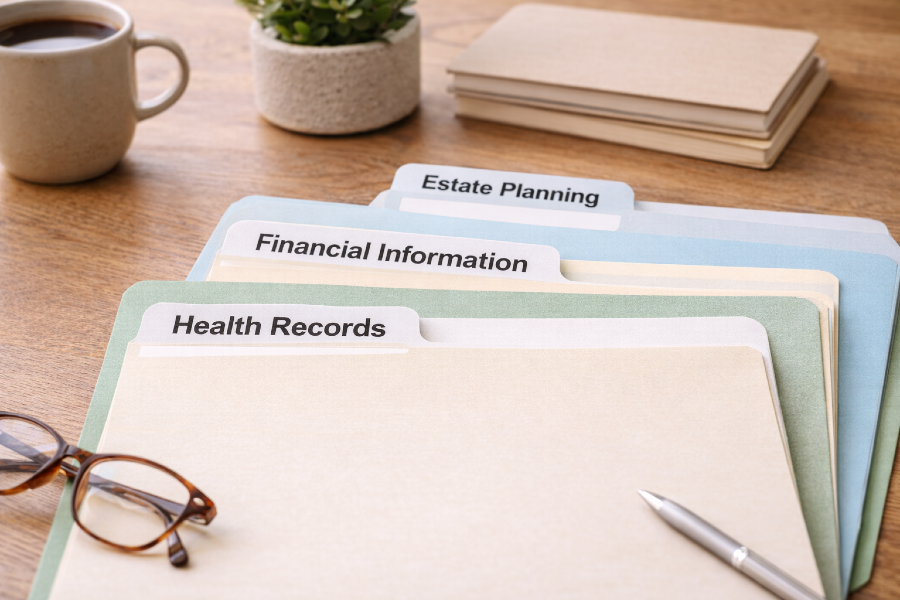
Option 2: A physical folder
A regular folder in a safe place at home, plus a note telling someone you trust where it is.
Honestly, you can do both.
But if doing both makes you stall, do one.
Done is better than perfect.
What I put inside (the short list)
This is the part everyone overcomplicates.
Here is what matters most.
1) The “One Page Overview”
This is the first thing inside the folder. It’s the map.
It includes:
- full name, birthday, and basic info
- emergency contacts
- doctor info (optional)
- where to find important documents
- where to find account info
- who to call first if something happens
That’s it.
One page.
2) Important documents
You can scan or photograph these if it’s digital.
Examples:
- ID
- insurance cards
- Medicare info if applicable
- property or lease info
- car info
- any legal docs you already have (will, trust, POA, etc.)
3) Accounts list (not passwords)
This is where people get stuck, so I’m going to make it simple.
You do not need to list every password in a document.
What you do need is an accounts list that says:
- bank name
- credit card name
- utilities
- phone provider
- email provider
- insurance provider
- subscriptions that auto bill
- where your digital products live (if you’re a creator)
This helps someone know what exists and where to start.
4) Monthly bills and money flow
This can be a simple list:
- what bills get paid
- when they hit
- how they are paid (auto pay, manual, etc.)
It is not about sharing every detail.
It’s about preventing the chaos of “What do we even pay and when?”
5) A short “What I want” note
This is the most human part.
It can be a simple note that says:
- who to contact
- what matters to you
- any specific wishes you want respected
- where important things are in the house
This isn’t legal language.
This is a kindness.
Passwords: what I do instead of making it complicated
This part matters, so let me say it clearly.
I do not recommend storing all your passwords in a random document.
Here are better options:
Option 1: Use a password manager
If you already use one, great.
You can leave instructions in your folder about what you use and how someone would access it.
Option 2: Keep a handwritten password book
Some people hate this idea, but it’s common and practical.
If you do this, store it somewhere safe and make sure one trusted person knows where it is.
Option 3: Keep a “how to access” note
This is what many people need most.
A note that says:
- the email you use for important accounts
- how your two factor authentication works
- where your password manager or password book is
Simple instructions beat scattered passwords every time.
If you’re a creator, add this (it matters)
If you run a blog, sell digital products, or have social accounts, this part is huge.
Add a section called:
My Creator Accounts
List:
- your website platform (Ghost)
- your domain provider
- your email/newsletter setup
- where you sell digital products (Payhip, Etsy, etc.)
- your main social accounts
- any income accounts connected to payouts
You do not need to write a novel.
Just list what exists.
Because if something happened, the question becomes:
- how does the site stay live
- how do subscriptions get managed
- where does income land
- who has access
That is real life. And it’s worth organizing.
Set it up in 30 minutes (here is how)
If you’ve been avoiding this, do it like this.
Step 1: Create the folder
Digital or physical.
Step 2: Create the One Page Overview
Open a doc and write the basics.
Do not overthink it.
Step 3: Add 3 essentials
Pick three to add today:
- ID photo
- insurance card
- list of accounts
Step 4: Add one creator section (if applicable)
Just list the platforms.
Step 5: Tell one trusted person where it is
This is the step people forget.
The folder is useless if no one knows it exists.
How I maintain it without turning it into a project
Here’s what makes this sustainable.
Once a month, I take 10 minutes and update:
- any new bills
- any changes in accounts
- any changes in contact info
That’s it.
You don’t need a perfect system.
You need a simple habit.
My honest take
This folder is not fun to make.
But it is one of the most loving things you can do for your family.
And it also does something unexpected.
It gives you peace of mind right now.
Because you know you handled it.
If you want my full February legacy tune up post, link this sentence to that post.
Quick question for you
If you did this this weekend, what would be the easiest first step:
- create the folder
- write the one page overview
- or list your accounts
Pick one and start there.
Family Essentials One Page Overview (Free Template)
I made this because I wanted a calm, simple way to keep the important stuff in one place. This is not meant to be complicated. Fill it out once, save it, and update it occasionally. The goal is peace of mind and fewer loose ends.
If something unexpected happened tomorrow, would your family know where to start?
This one page template is my simple answer to that question.
It’s not a legal document. It’s not meant to replace a will or anything formal. It’s just a clean, practical “here’s where everything is” overview you can fill out in one sitting and update in minutes.
Inside the template, you’ll organize:
- Emergency contacts and basic information
- Medical and pharmacy details (optional)
- Where important documents are located
- Accounts overview (names and providers, not passwords)
- A simple password access plan (without making it complicated)
- A short “my wishes” note that’s human and clear
- Creator and digital life details (website, domain, newsletters, payouts, social accounts)
- Folder location and update reminders
Who this is for
- Anyone who wants a simple, calm way to get organized
- Couples who handle different parts of the household and want clarity in one place
- Creators and small business owners who want their digital life to be easy to manage if needed
- Anyone over 50 or 60 who is tired of scattered notes and “I’ll do that later” lists
How to use it
- Download the Word version, fill it out, and save it somewhere safe.
- Export it as a PDF for a clean final copy.
- Tell one trusted person where it is.
- Update it once a month or once a quarter. Ten minutes is plenty.
Important note
Share this only with someone you trust. Do not post your completed version publicly. Keep passwords out of the template and use a password manager or a secure method you’re comfortable with.
Disclaimer: This template is for informational purposes only and is not legal or financial advice.
Disclaimer:
This content is for informational purposes only and is not medical advice. Always consult your healthcare provider before making changes to your diet, supplements, or lifestyle, especially if you have existing conditions or take medication.
💌Want plant-based tips each week
Join the Plant Based Flex newsletter. It’s free, and when you confirm your email I’ll send you a 7-Day Kickstart Wellness Bundle to help you thrive beyond 60.